Invoices, time and projects for Mac

You do the work. Paydesk does the rest.

Plan projects, track every hour, turn unbilled time into an invoice in one click, and always know who owes you. One calm Mac app, and nothing ever leaves your Mac.

One-time purchasemacOS 15 Sequoia or laterMac App Store version coming soon

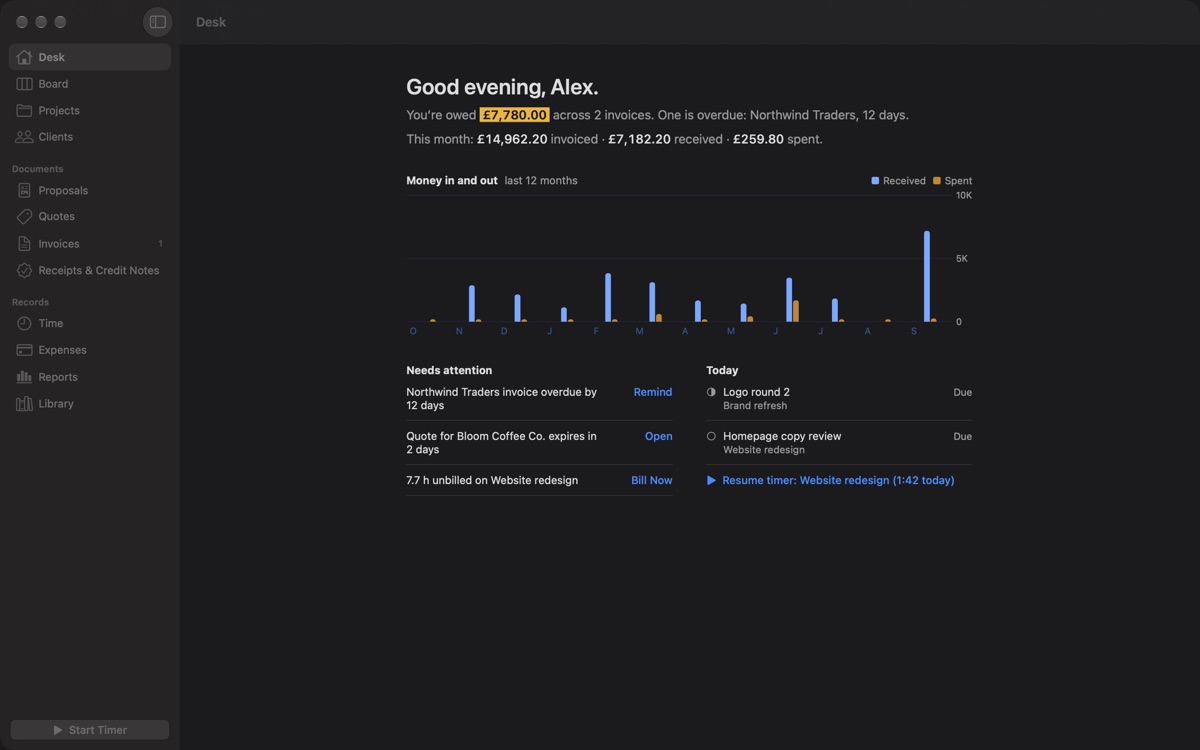
The Paydesk Desk: “Good evening, Alex. You’re owed £7,780.00 across 2 invoices”, a chart of money in and out over twelve months, and a list of what needs attention today.

Sound familiar?

  • Hours on sticky notes.
  • Invoices in spreadsheets.
  • Payments in limbo.

Paydesk keeps the whole loop in one place. Plan the work, track the time, bill it, get paid and see how the year is going, without copying a single number from one app to another.

How it works

From first lead to paid, in one app.

Five things every freelancer does again and again, each one a click from the next.

01Plan

Plan the work.

Every project sits on one board, from Lead and Proposal sent through In progress, Delivered, Invoiced and Paid. Open a project and its tasks, logged time, quotes and invoices are all there.

  • Tasks with due dates, estimates and checklists, as a board or a list
  • Client pages show lifetime revenue and how quickly each client pays
  • Jump to any client, project or document with ⇧⌘O
The Paydesk board with projects in the Lead, Proposal sent, Accepted, In progress and Delivered columns.

02Track

Track every hour.

Start the timer from the window, the menu bar, or ⌃⌥Space in any app. Step away for lunch and Paydesk asks what to do with the idle time, so your timesheets stay honest.

  • The menu bar timer keeps running with the window closed
  • Log time by hand and review it by day or by week
  • Round billed time up to the increment you charge in
The Time view in Paydesk listing time entries by day, with start and end times and durations.

03Bill

Bill in one click.

Paydesk keeps a running total of unbilled hours and billable expenses on every project. Press Bill Now and they land on a draft invoice, grouped by task, at the right rate.

  • Proposals, quotes, invoices, receipts and credit notes
  • Turn an accepted quote into an invoice without retyping a line
  • Save your services and rates to the Library and reuse them anywhere
A draft invoice in Paydesk for a monthly retainer, with the line item, VAT and total, and the document settings beside it.

04Get paid

Know who owes you.

The Desk opens on one highlighted number: what you’re owed. Overdue invoices, expiring quotes and unbilled work sit right under it, each with its next step: Remind, Open or Bill Now.

  • Reminders open in Mail in your client’s language, with the PDF attached
  • Record full and partial payments as they arrive
  • Numbers never repeat and issued invoices can’t be edited. Corrections go through a credit note, the way accountants expect
An issued Paydesk invoice marked Overdue, with the amount due, payments and a Record Payment button.

05Report

Know your numbers.

Invoiced, received, expenses and profit for any period. Aging shows who’s late, tax charged is totalled for your accountant, and every project shows what you really earned per hour.

  • Read receipts with on-device text recognition to log expenses
  • The accountant pack: one ZIP of CSVs, every issued PDF and every receipt
  • Export everything, whenever you like
Paydesk Reports showing invoiced, received, expenses, profit and outstanding totals, income by client, aging and tax charged.
Documents

Invoices you’ll be glad to send.

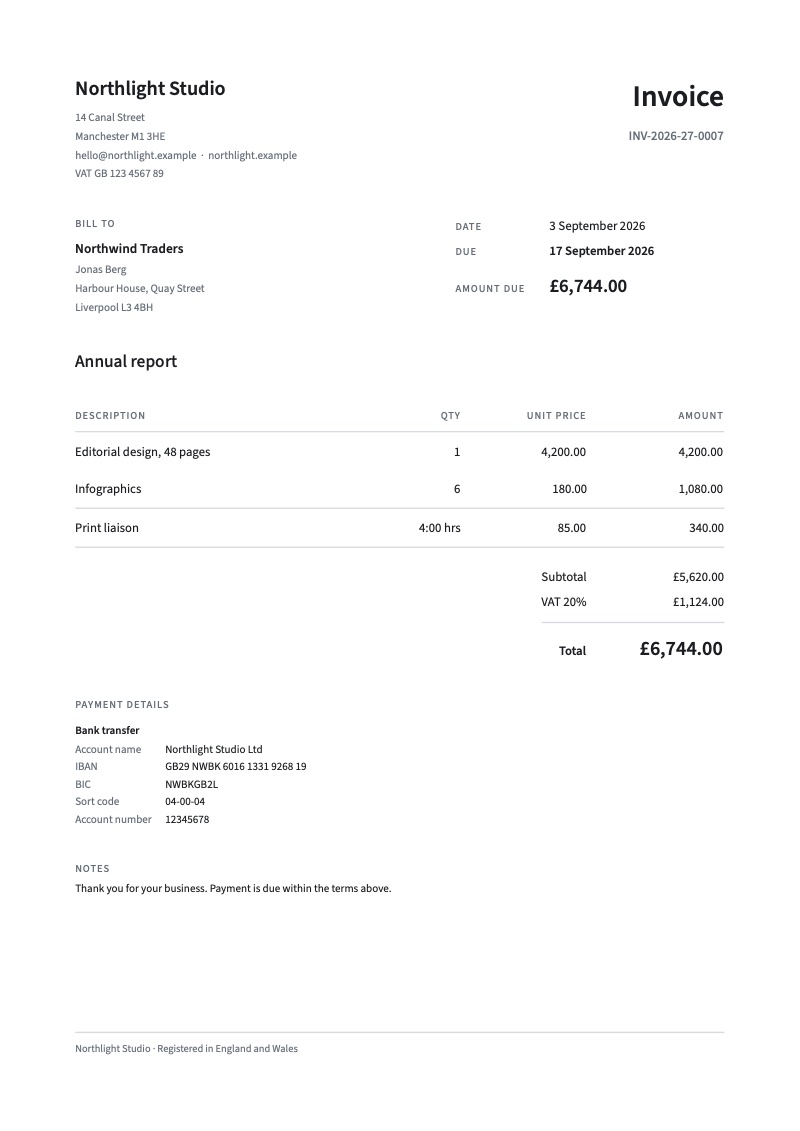
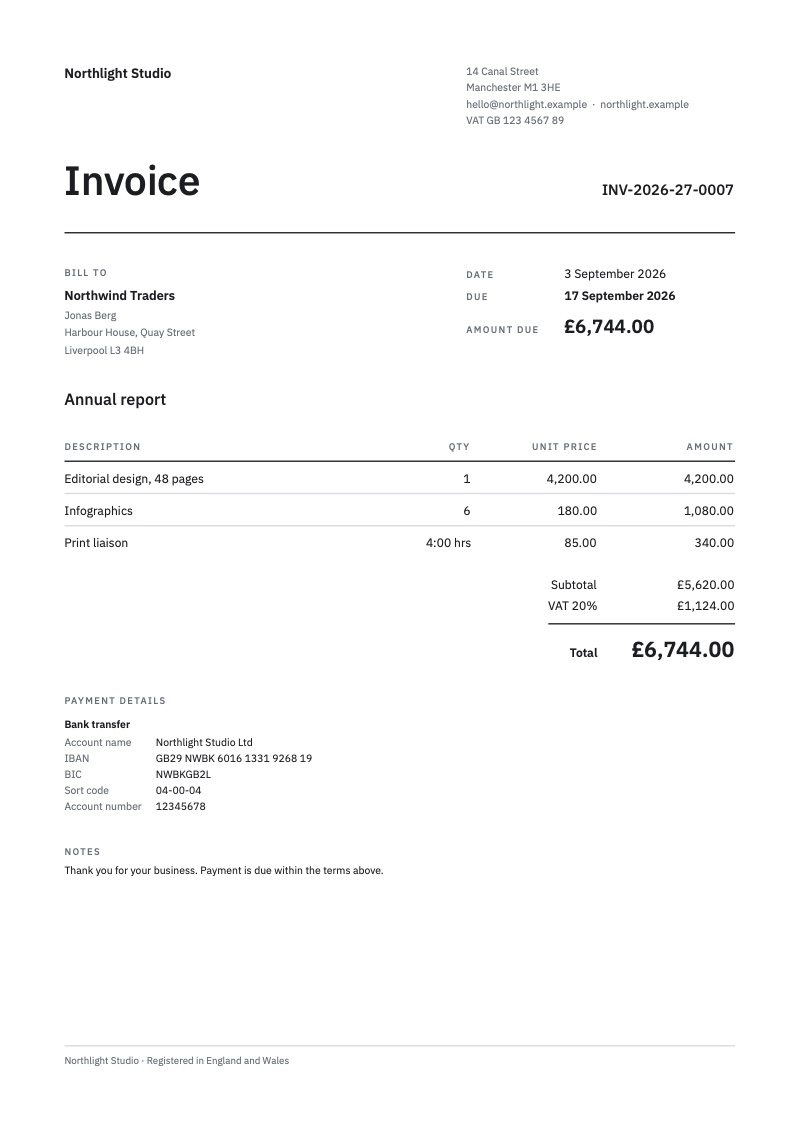
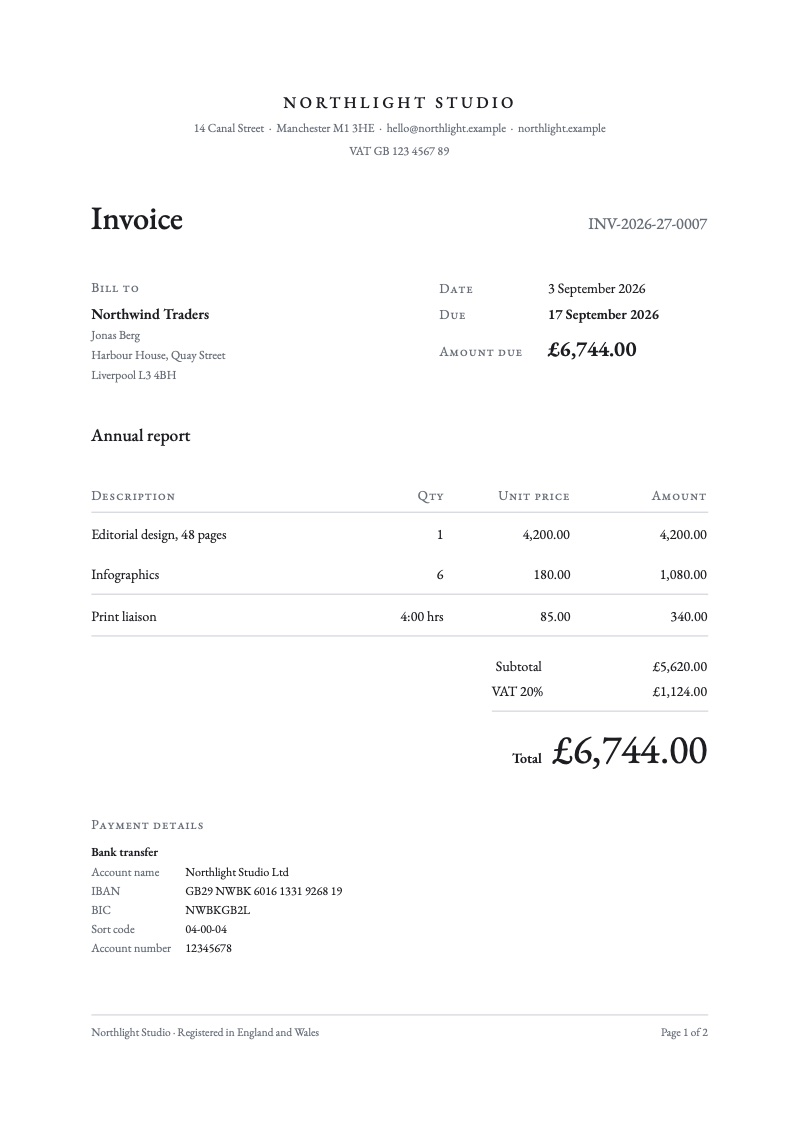
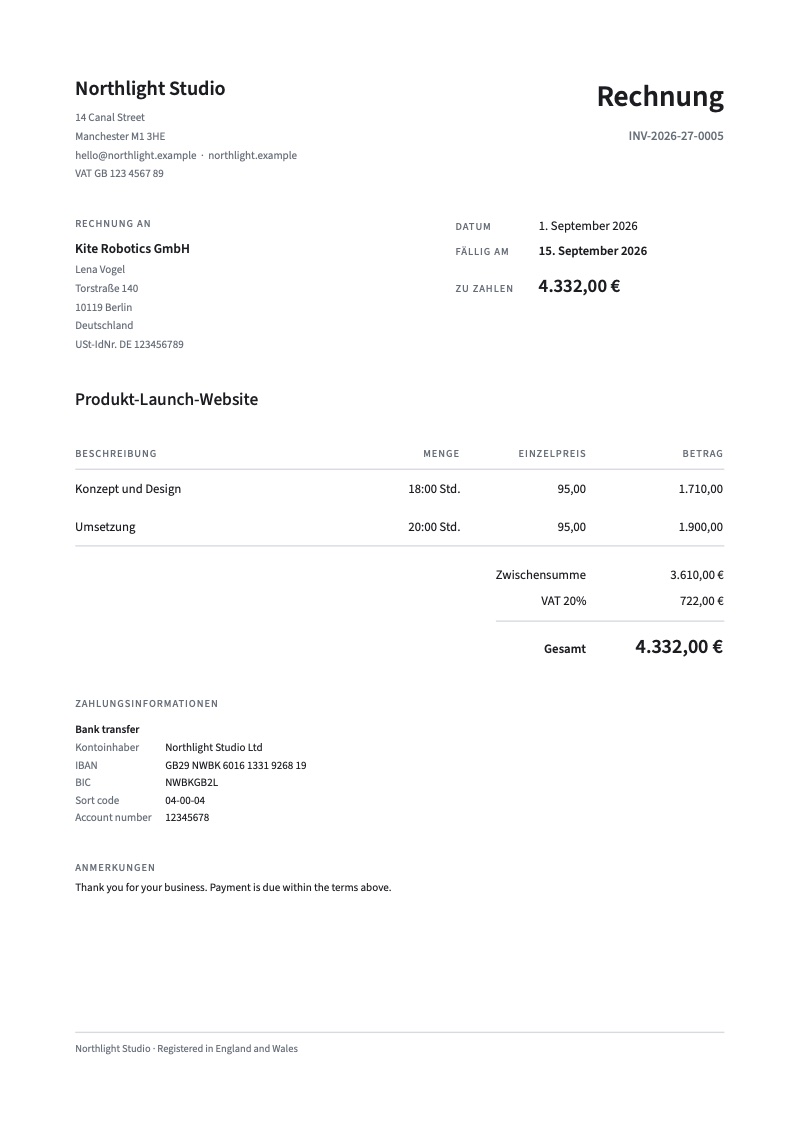
Three typeset templates in nine languages. Every document is a crisp vector PDF, ready to email or print on A4 or US Letter. These are real exports from Paydesk.

An invoice in the Ledger template: clean sans-serif type, a bill-to block, line items, VAT and a total of £6,744.00.
LedgerSet in Source Sans 3.
The same invoice in the Swiss template: a large Invoice heading on a strict grid.
SwissSet in IBM Plex Sans.
The same invoice in the Atelier template: centred small-caps letterhead and Garamond type.
AtelierSet in EB Garamond.
A German invoice (Rechnung) from Paydesk with German labels, dates and euro amounts, total 4.332,00 €.
RechnungAny template, nine languages.
Documents
Proposals, quotes, invoices, receipts and credit notes
Languages
EnglishDeutschFrançaisEspañolItalianoNederlandsPortuguês日本語العربية
Currencies
Any currency, including invoices in your client’s currency
Tax
Editable presets for 25 countries and regions: UK and EU VAT, Swiss MWST, Norwegian MVA, GST for Australia, New Zealand, Singapore, Canada and India (CGST + SGST or IGST), Japanese consumption tax and US sales tax. Your tax number prints with the local label: ABN, GSTIN, UEN, USt-IdNr. and more.
Numbering
Your own format, such as INV-{yyyy}-{seq:4}, reset yearly or by fiscal year. Numbers are assigned on issue and never repeat.
Payment
Your bank details on every document, plus a SEPA payment QR code for euro transfers
Paper
A4 or US Letter, with right-to-left layout for Arabic

Tax presets are editable starting points, not tax advice. Check your rates with your accountant.
Private by design

No account. No cloud. No tracking.

Paydesk is a Mac app in the old-fashioned sense: it runs on your Mac and keeps your work there. Client names, rates and invoices never touch a server, ours or anyone else’s.

Nothing to sign up for

Open Paydesk and start working. There’s no account to create and no password to remember.

No network access at all

The app is built without permission to use the network, so it can’t connect to the internet. Settings says it plainly: Network access: None and Analytics: None.

Your library, your files

Everything lives on your Mac and is included in Time Machine backups. Export CSVs, an accountant pack or a complete archive whenever you like. Read the privacy policy.

The Paydesk Desk in dark mode.
Made for the Mac

At home on macOS.

Built with Apple’s own frameworks, designed for Liquid Glass on macOS 26 Tahoe, and just as comfortable in dark mode.

  • Start or stop the timer⌃⌥Space
  • Open Quickly⇧⌘O
  • Print any document⌘P
  • Menu bar timerWorks with the window closed
  • AppearanceLight and dark
  • RequiresmacOS 15 Sequoia or later
Pricing

The only invoice we’ll ever send you.

One price, paid once. Every feature, no tiers, no subscription.

Invoice

No. PD-0001
Due on purchase

FromMinilabs
support@minilabs.cc
Bill toYou
Freelancer, consultant or studio
DescriptionQtyAmount
Paydesk for MacProjects, time, quotes, invoices, expenses and reports1$9.99
SubscriptionThere isn’t one–$0.00
AccountNot required–$0.00
Amount due$9.99

Terms: pay once. Prices in US dollars; local taxes may apply.

Buy direct

Pay once and download Paydesk straight from us.

Buy direct $9.99

Mac App Store

Pay once with your Apple Account. Installs and updates through the App Store.

Download on the Mac App Store Mac App Store Coming soon

Requires macOS 15 Sequoia or later. The Mac App Store version is coming soon. Press its button to email us, and we’ll write back the day it’s out.

Questions

Straight answers.

Platform
Mac, macOS 15 or later
Price
$9.99, one-time
Made for
Freelancers and small studios
Your data
Stays on your Mac
Account
None needed
Invoice languages
9
Tax presets
25 countries and regions
Made by
Minilabs
What is Paydesk?

Paydesk is a Mac app for freelancers, consultants and small studios. It keeps projects, time tracking, quotes, invoices, expenses and reports in one place, and it runs entirely on your Mac.

How much does it cost?

$9.99, paid once. Buy it directly from us or from the Mac App Store. There’s no subscription and no paid tier: every feature is included.

Do I need an account?

No. Open Paydesk and start working. There’s nothing to sign up for and no password to remember.

Where is my data stored?

In Paydesk’s library on your Mac. The app has no network access, so nothing is uploaded anywhere. The library is included in Time Machine backups, and you can export CSVs, an accountant pack or a complete archive whenever you like.

Does Paydesk sync between Macs?

Not yet. Each Mac keeps its own library. If you move to a new Mac, Migration Assistant or a Time Machine restore brings your library with it.

Can Paydesk send invoices or take card payments?

Paydesk makes the PDF and opens a Mail message with it attached, written in your client’s language. You check it and press Send.

It doesn’t process payments. Your invoices carry the bank details you already use, plus a SEPA payment QR code for euro transfers.

Which countries and currencies does it support?

Any currency. Tax presets cover 25 countries and regions, including UK and EU VAT, Swiss MWST, GST for Australia, New Zealand, Singapore, Canada and India (with CGST, SGST and IGST), and US sales tax at your own rate. Presets are editable starting points, not tax advice.

What languages can my invoices be in?

Nine: English, German, French, Spanish, Italian, Dutch, Portuguese, Japanese and Arabic, including right-to-left layout for Arabic. The app itself is in English.

Can I bill expenses to a client?

Yes. Mark an expense as billable and Bill Now adds it to the draft invoice with the project’s unbilled hours. Paydesk can also read a receipt on your Mac to fill in the expense for you.

Is Paydesk accounting software?

No. It covers the freelance loop: projects, time, quotes, invoices, payments and expenses. For your books, the accountant pack gives your accountant CSVs, every issued PDF and every receipt in one ZIP. Recurring invoices aren’t available yet.

What do I need to run it?

A Mac with macOS 15 Sequoia or later. Paydesk is designed for Liquid Glass on macOS 26 Tahoe, and works in light and dark mode.

How do I get help?

Email support@minilabs.cc. The support page covers getting started, time tracking, invoices, your data and purchases.

Close the spreadsheet.

Paydesk is $9.99, once. Your next invoice will look better than your last one.